Short Explanation
Cincy DOT Physicals is a DOT physical clinic in Cincinnati that serves commercial truck drivers. The client needed a site that actually converts, since his patients are checking their phones between jobs, not browsing on a desktop with time to spare.
I took this one from first wireframe to DNS cutover. Design, frontend build, booking integration, technical SEO, and handing over the full infrastructure to the client at the end. Solo, end-to-end.
What I Worked With
The client came in with a folder of ChatGPT-generated mockup images. Not references, exact specs. Every layout, every section, every flow was already decided in his head, and he wanted the live site to match what he'd shown me.
That's a fine brief, but comparing a live site against a static AI-generated image gets messy fast. The moment something feels "slightly off," you're guessing whether it's the spacing, the font weight, or just a rendering difference. Nobody wants to burn a revision cycle on that.
 The AI-generated mockups reference from the client
So before writing any code, I built a proper Figma file based on his references, structured and inspectable. That turned the comparison into design-to-implementation instead of image-to-browser, which is a much easier thing to agree on. I also set up an actual design system underneath it, typography hierarchy, spacing scale, semantic color palette, so every decision after that had something to point back to instead of being re-litigated each time.
 The design tokens and style guide
The Booking Confirmation, Without a Database
Booking runs through Acuity Scheduling, embedded as an iframe. The client's on Acuity's Starter plan, $16/mo. That one fact shaped the whole feature.
The site is conversion-focused, every section pushes toward CALL NOW or BOOK
ONLINE. So I didn't want someone to book and land on Acuity's generic in-iframe
confirmation. I wanted a branded /thank-you page: real appointment details,
add-to-calendar buttons, next steps, a referral CTA.
Two walls, at the same time:
- The clean fix, look the appointment up server-side via Acuity's REST API, needs the Powerhouse plan ($25/mo). Starter returns a 403.
- The obvious hack, have the iframe redirect the parent window, is blocked by
modern browsers. Cross-origin iframes can't set
window.top.location. So the problem became: move booking data across a cross-origin boundary, land it on my own page, and trust it. No paid API, no database.
What I built instead: a stateless handoff, signed instead of stored.
Step 1: listen for the postMessage, with an origin check.
Acuity's "Conversion Tracking" hook (the one thing Starter gives you) broadcasts
the booking to the parent window on completion. booking.tsx listens, but
verifies the sender before trusting anything:
function handleMessage(event: MessageEvent) {
	let msg: {
		type?: string
		email?: string
		date?: string
		time?: string
	} | null = null
	try {
		const { hostname } = new URL(event.origin)
		if (
			!hostname.endsWith('.acuityscheduling.com') &&
			!hostname.endsWith('.acuityinnovation.com')
		)
			return
		msg = typeof event.data === 'string' ? JSON.parse(event.data) : event.data
	} catch {
		return
	}
	if (msg?.type !== 'acuity.booking') return
	// ...sign and redirect
}
The try/catch wrapping new URL(event.origin) is load-bearing, a malformed
origin would throw without it. The type check on event.data handles Acuity
sending either a raw string or a parsed object depending on context.
Step 2: sign the payload on the Worker, redirect with the token.
The browser POSTs { email, date, time } to /api/sign-booking. The Worker
adds a timestamp and signs the whole thing with HMAC-SHA256 using
BOOKING_SIGNING_SECRET, stored as a Cloudflare secret. It also does a
same-origin guard before touching anything:
const origin = request.headers.get('origin')
const host = request.headers.get('host')
if (!origin || !host || new URL(origin).host !== host) {
	return Response.json({ error: 'forbidden' }, { status: 403 })
}
The token that comes back is base64(payload).base64url(signature), an opaque
blob. The browser navigates to /thank-you?token=<blob>. No email, no name, no
appointment time in the URL.
Step 3: verify server-side before rendering anything.
The thank-you.tsx loader runs on the Worker. It re-derives the HMAC, verifies
the signature, and checks the timestamp is under 5 minutes old:
async function verifyAndExtract(
	token: string,
	secret: string,
	maxAgeMs = 5 * 60 * 1000,
) {
	const dot = token.indexOf('.')
	if (dot === -1) return null
	const payloadB64 = token.slice(0, dot)
	const sigB64url = token.slice(dot + 1)
	// re-derive and verify with Web Crypto, same API available in both
	// Cloudflare Workers and the browser
	const valid = await crypto.subtle.verify(
		'HMAC',
		key,
		sigBytes,
		new TextEncoder().encode(payload),
	)
	if (!valid) return null
	const data = JSON.parse(payload)
	if (Date.now() - data.ts > maxAgeMs) return null
	return { email: data.email, date: data.date, time: data.time }
}
Tampered or expired tokens return null; the loader falls back to
{ date: null, time: null, email: null } and the page renders a generic
confirmation. The token is the state no KV, no DB, entirely on the edge.
The timezone problem is more subtle than it looks.
Workers run in UTC. Acuity sends locale-formatted strings like "July 5, 2024"
/ "9:00am", not ISO timestamps. I needed calendar links and .ics files to
land at the right wall-clock time regardless of where the page renders or opens.
The fix: parse those strings into plain { year, month, day, hour, minute }
components and pin every calendar event to America/New_York explicitly, using
Google's ctz param and iCal TZID. No UTC conversion involved. The "TODAY AT
9:00 AM" label is also intentionally deferred to a client-side useEffect to
avoid an SSR/client hydration mismatch between the Worker (UTC) and the
visitor's local clock:
useEffect(() => {
	const appt = parseAppointment(dateParam, timeParam)
	if (appt && timeParam && isToday(appt)) {
		setAppointmentLabel(`TODAY AT ${normalizeTimeLabel(timeParam)}`)
	} else {
		setAppointmentLabel(formatDateLabel(appt, dateParam, timeParam))
	}
}, [dateParam, timeParam])
Server renders the date-form label. Client upgrades it to "TODAY" only after mount, once it knows the visitor's local timezone. One hydration footgun, avoided.
Where it's honestly weak:
- It trusts whatever the browser sends to get signed. Someone in devtools could POST fake data and get a valid token but the blast radius is just a fake thank-you page with their own made-up details. No other user's data is reachable.
- If the
postMessagenever fires (ad blocker, Acuity changes their script), the user stays on Acuity's in-iframe confirmation. No graceful fallback on our side. - It leans on undocumented Acuity template variables that could change. The real fix is Acuity webhooks into Cloudflare KV: server-to-server, nothing to spoof. I scoped it, didn't build it. The constraint was real Starter plan, no API and the signed-token approach met the need at zero added cost.
Mobile-First, For Real This Time
The client was explicit from day one: this site is for drivers checking their phone between jobs, not people sitting at a desk. Desktop was secondary, and it showed in his references, almost every mockup he sent was a mobile screenshot. Single column, big tap targets, stacked sections. There was no desktop reference to work from at all.
That actually made things easier, not harder. Every wider-screen decision became "what does this look like as a natural extension of the mobile intent," not "how do I fill this extra space." I designed mobile-first in Figma, built fluid breakpoints with Tailwind, and treated desktop as an adaptation of the mobile design rather than its own thing.
The mobile-first website in live action
Migrating a Ranking Site Without Losing the Ranking
None of the above mattered if the migration itself tanked his SEO. The client was already ranking well for his core search terms before this project, and a full platform switch, new hosting, and a domain change (from a shared-DNS WordPress setup on SiteGround to Cloudflare Workers) is exactly the kind of move that quietly kills years of accumulated ranking. That risk was the client's main hesitation going in, more than the design, more than the build.
So the migration got treated as its own workstream, not an afterthought bolted on at the end:
- 301 redirects from every old URL pattern, including leftover WordPress query
strings (
?page_id=,?wpr_templates=,?feed=comments-rss2) that were still indexed, to their equivalent on the new site - Canonical tags on every route, explicitly pointing to the non-www version, independent of the redirect (belt and suspenders, redirects alone don't guarantee Google treats a URL as canonical)
- Structured data (Organization, LocalBusiness, FAQPage schema), title tags, and meta descriptions rebuilt per route
- A fresh sitemap, resubmitted, plus a new Google Search Console property verified via DNS after the domain move One wrinkle worth naming: a few weeks post-launch, the client's SEO consultant flagged a scare, Search Console showing impressions and clicks dropping to near-zero right after the redesign. Turned out they were looking at the old, pre-migration property, still tracking the www version that no longer received direct traffic since everything now redirects away from it. The real numbers were sitting in the new property the whole time.
Once we were both looking at the right data, a month-over-month comparison told the actual story:
| Metric | Month before migration | Month after migration |
|---|---|---|
| Average position | 15.7 | 11.3 |
| Impressions | 5.39K | 4.99K |
| Clicks | 103 | 77 |
Average position improved. Core terms, the clinic's brand name, "dot physical cincinnati," "cdl physical", held or improved into the top 3. Click and impression totals dipped slightly in that window, which I'm not going to spin as a win; a single month of SERP fluctuation isn't proof of anything either way. What matters is that nothing broke. No de-indexing, no lost pages, no ranking collapse, on a migration that's a fairly common way for a business to quietly lose its search visibility.
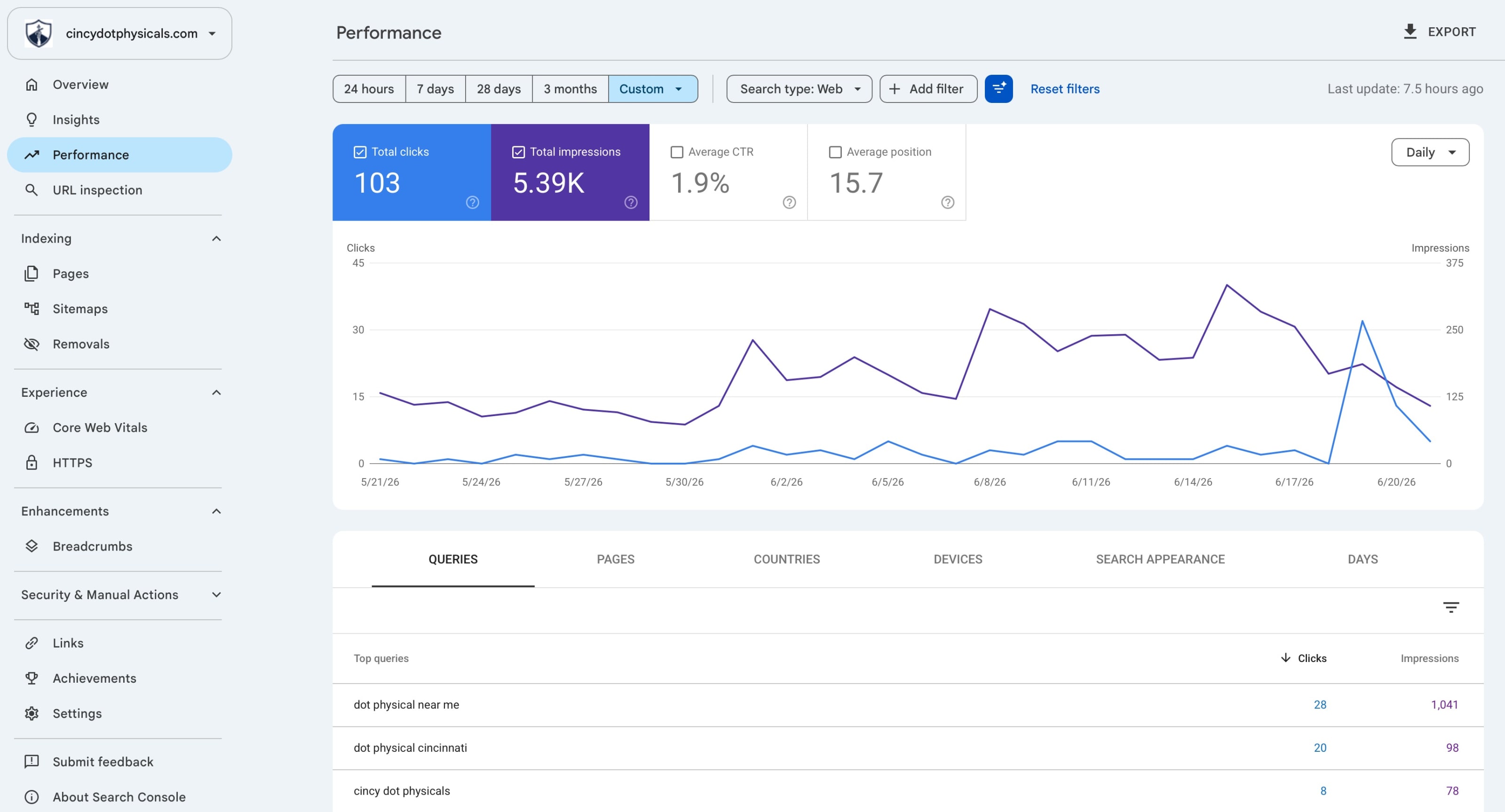 The performance before migration
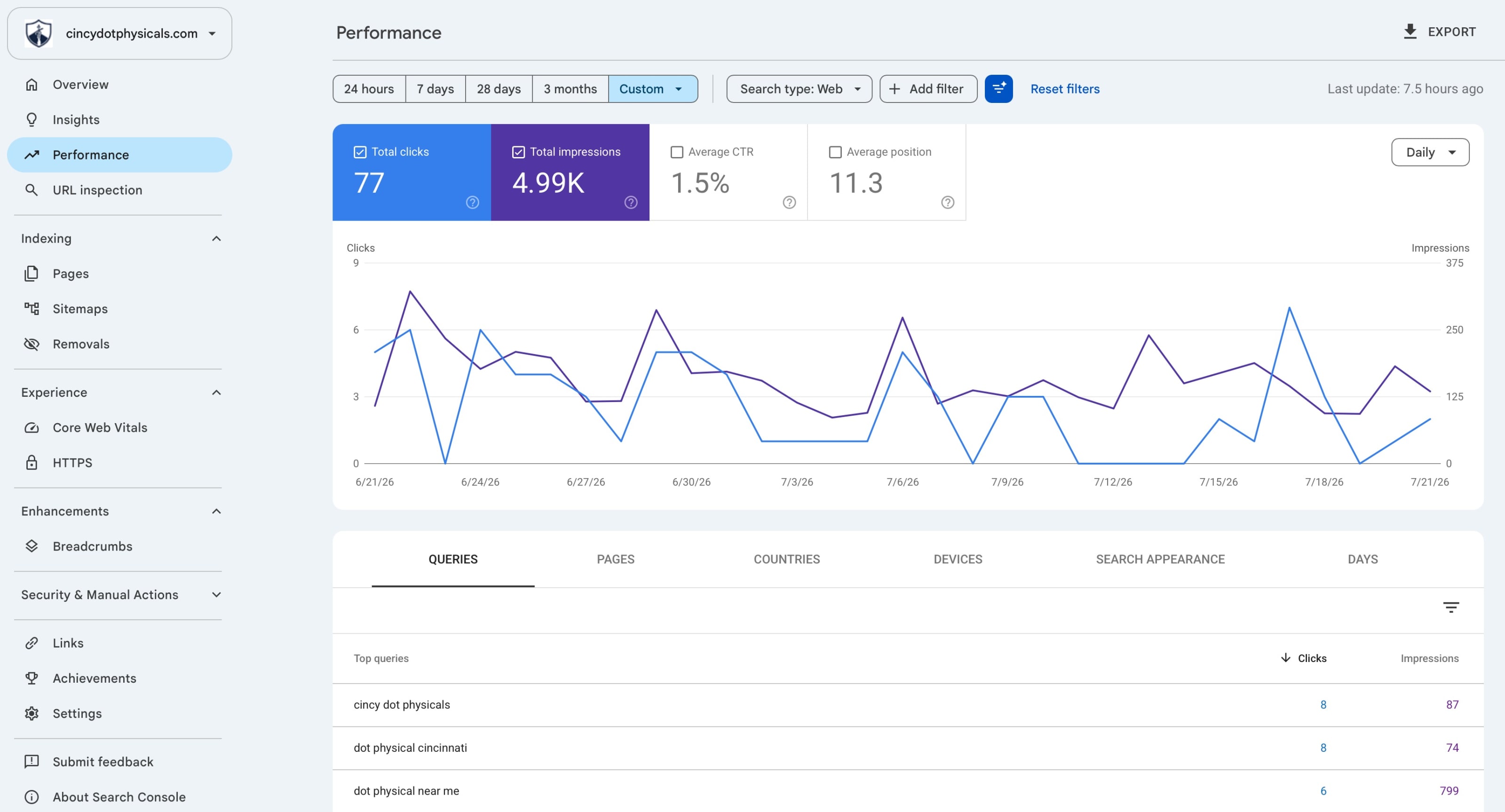 The performance after migration
The Result
An SSR site on Cloudflare Workers, fast by default. A custom booking flow with a branded confirmation page instead of a generic redirect. Full technical SEO, migrated with the ranking intact. GA4 wired up, Search Console verified.
And by the end, the client owned everything, GitHub, Cloudflare, domain, all moved into his own accounts before I called it done.
Lessons Learned
Working from someone else's AI-generated mockups is a specific kind of constraint I hadn't dealt with before. It's tempting to just eyeball it and start building, but the ambiguity compounds fast once you're a few sections in. Building the intermediate Figma layer wasn't extra work, it was what made the whole project move quickly once we started, because disagreements got resolved against a structured file instead of a JPEG.
The other thing that stuck with me: having zero desktop references from the client turned out to be a gift. It kept the site honest to what actually mattered, drivers booking a physical from their phone, instead of me over-designing a desktop experience nobody in the target audience was going to use.
And the SEO scare taught me to keep raw exports, not just screenshots, of anything I'd want to point back to later. "Trust me, the numbers are fine" isn't a deliverable. A CSV export from Search Console is.